
如何退款和取消自动续费?
请根据支付平台查看如何取消自动续费
支付宝
进入支付宝APP后,依次打开“我的-右上角设置按钮-支付设置-免密支付/自动扣款”,在列表中找到QuickFox扣费项目后,点击后选择【关闭服务】即可。
PayPal
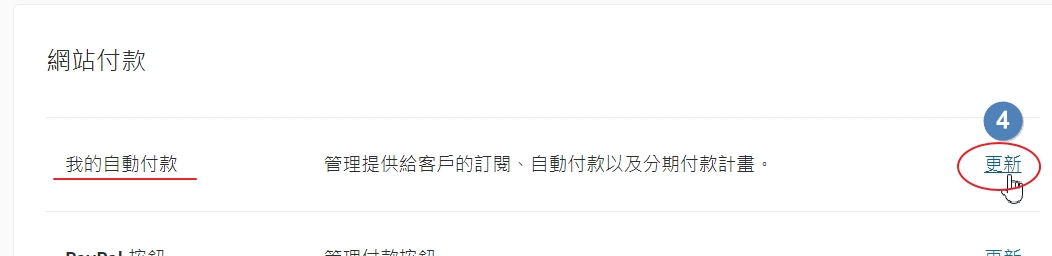
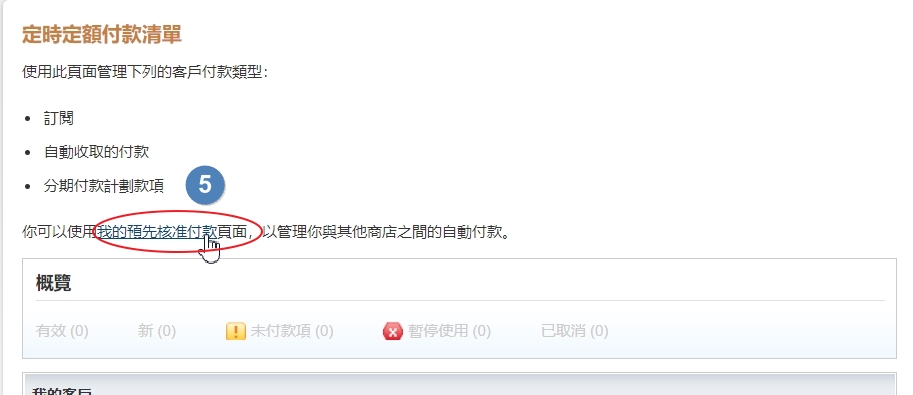
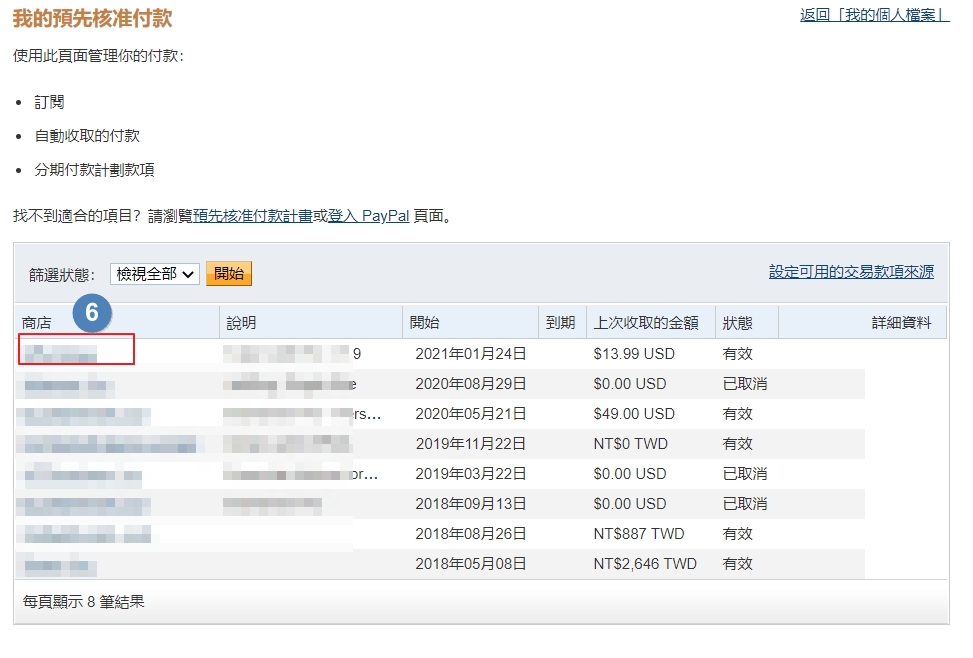
登录PayPal官网,依次点击“设置-账户设定-网站付款-我的自动付款-更新”,在循环付款面板点击“我的预先核准付款”,在列表中找到QuickFox扣费项目后,点击【取消】即可。
Please check how to cancel auto - renewal according to the payment platform.
Alipay
After entering the Alipay APP, successively open "My - Settings button in the upper - right corner - Payment Settings - Password - free Payment/Automatic Deduction". Find the QuickFox deduction item in the list, click on it, and then select [Close Service].
PayPal
Log in to the official PayPal website, click "Settings - Account Settings - Website Payments - My Automatic Payments - Update" in sequence. In the Recurring Payments panel, click "My Pre - approved Payments". Find the QuickFox deduction item in the list and click [Cancel]. 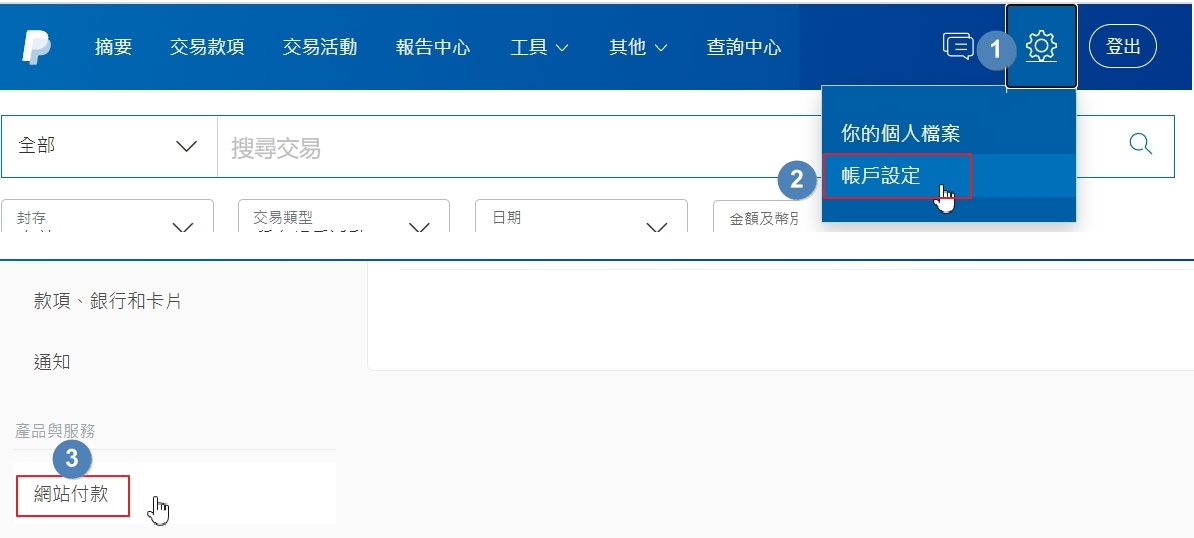
如您直接使用银行卡完成支付并未创建PayPal账户,可查看付款时填写的电子邮件地址,里面会有一封PayPal的邮件收据,点击邮件中的链接即可注册PayPal账户。
If you directly use a bank card to complete the payment and did not create a PayPal account, you can view the email address filled in during the payment. There will be a PayPal email receipt in it. Click the link in the email to register a PayPal account.
iOS
进入系统设置后,依次打开“个人Apple ID-订阅”,在列表中找到QuickFox扣费项目后,点击【取消订阅】即可。
Google Play市场
进入Google Play应用市场,依次打开“右上角个人头像-付款和订阅-订阅”,在列表中找到QuickFox扣费项目后,点击【取消订阅】即可。
微信
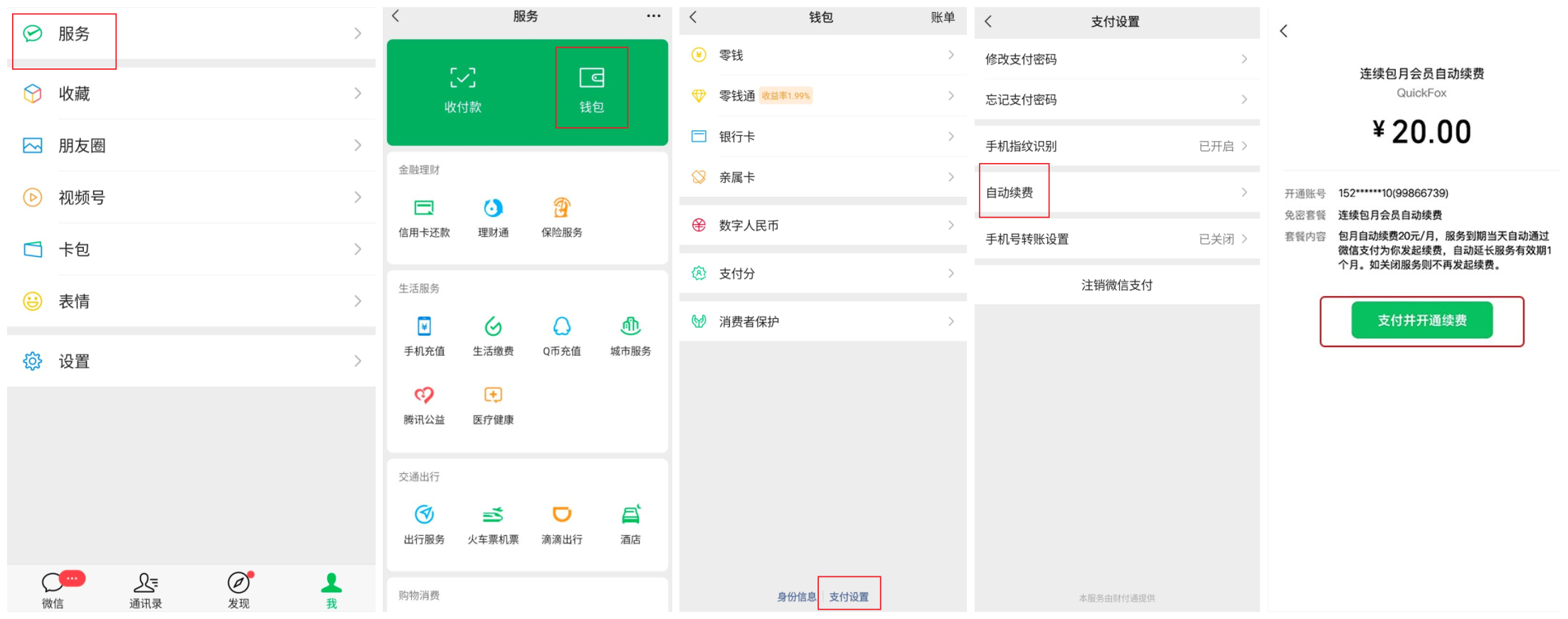
进入微信,依次点击“我-服务-钱包-最底端支付设置-自动续费”,将QuickFox自动续费关闭即可。
iOS
After entering the system settings, open "Personal Apple ID - Subscriptions" in sequence. Locate the QuickFox deduction item in the list and click [Cancel Subscription].
Google Play Store
Enter the Google Play app store, and open "Profile picture in the upper - right corner - Payments & subscriptions - Subscriptions" in sequence. Find the QuickFox deduction item in the list and click [Cancel Subscription].
Open WeChat, click "Me - Services - Wallet - Payment settings at the bottom - Automatic renewal" in sequence, and turn off the automatic renewal for QuickFox.
退款 refund
QuickFox支持用户在购买会员后的7天内享受无理由退款服务,每位用户只可发起一次退款申请。
安卓退款:使用安卓应用并在app内用支付宝,微信,paypal,银行卡支付的用户,请依次点击“更多-开通记录-右上角退款”,选择你需要退款的订单点击退款按钮即可完成退款,退款金额将按原路返回.
以下情况不支持退款
1、通过福利商城兑换获得的会员;
2、平台赠送的会员;
3、购买超过7天的订单;
4、已参加赠送会员给好友活动;
iOS退款:使用iOS支付的用户,因苹果公司机制规定,要求有用户本人在iTunes发起退款,需要您在iTunes选择订单进行退款,可参考苹果官方的退款流程:https://support.apple.com/zh-cn/HT204084
谷歌退款:使用谷歌支付购买用户可直接在谷歌商店内发起退款。
QuickFox supports users to enjoy a no - reason refund service within 7 days after purchasing a membership. Each user can only initiate one refund application.
For Android users, please click "More - Purchase Record - Refund in the upper - right corner" in sequence. Select the order for which you need a refund and click the refund button to complete the refund. The refund amount will be returned via the original payment method.
The following situations do not support refunds:
- Memberships obtained through redemption in the Gold Coin Mall.
- Memberships gifted by the platform.
- Orders purchased more than 7 days ago.
- Has participated in the activity of gifting membership to friends;
Due to the regulations of Apple's mechanism, iOS users are required to initiate a refund in iTunes by themselves. You need to select the order in iTunes for a refund. You can refer to Apple's official refund process: https://support.apple.com/zh - cn/HT204084
Users who purchased through Google can directly initiate a refund in the Google Play Store.