
登录/注册
中
帮助中心
加速
会员
其他
活动
如何使用兑换码
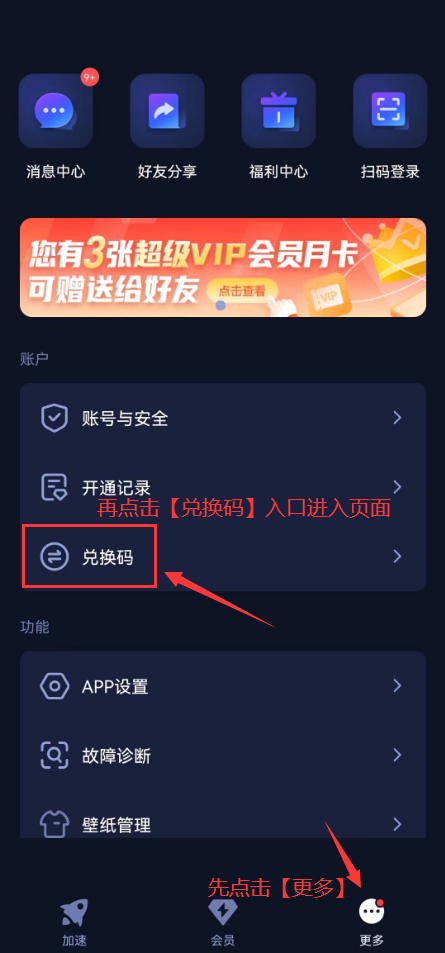
第一步:获取会员兑换码后,打开QuickFox移动端,依次点击“更多-兑换码”
Step 1: After obtaining the membership redemption code, open the QuickFox mobile app. Then, tap "More - Redemption Code" in sequence.
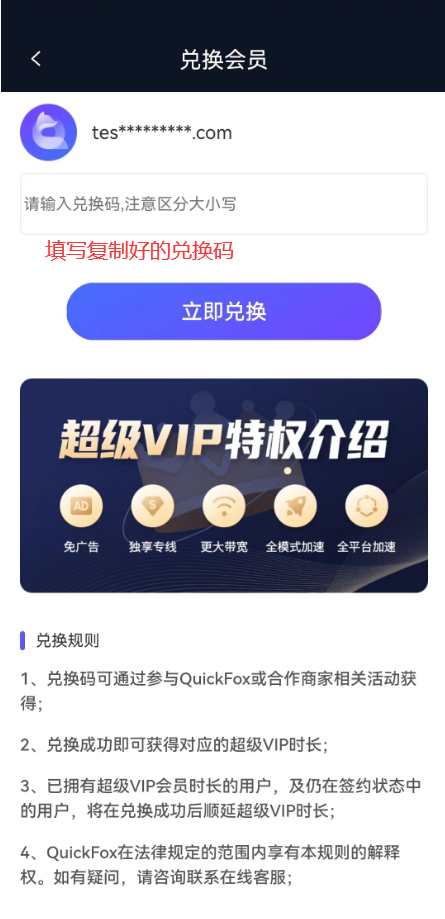
第二步:在跳转的兑换页面,输入复制好的兑换码,即可完成兑换,注意区分兑换码大小写。
Step 2: On the redirected redemption page, enter the copied redemption code. Please pay attention to the case - sensitivity of the redemption code to complete the redemption.
需要人工帮助?点击联系在线客服

© 2019-2026 海外华人回国加速器 All rights reserved. QuickFox 厦门科臻赛科技有限公司

© 2019-2026 海外华人回国加速器 All rights reserved. QuickFox 厦门科臻赛科技有限公司

官方客服微信