
QuickFox3.0 Windows端更新说明
1.影音模式 Video and Audio Mode
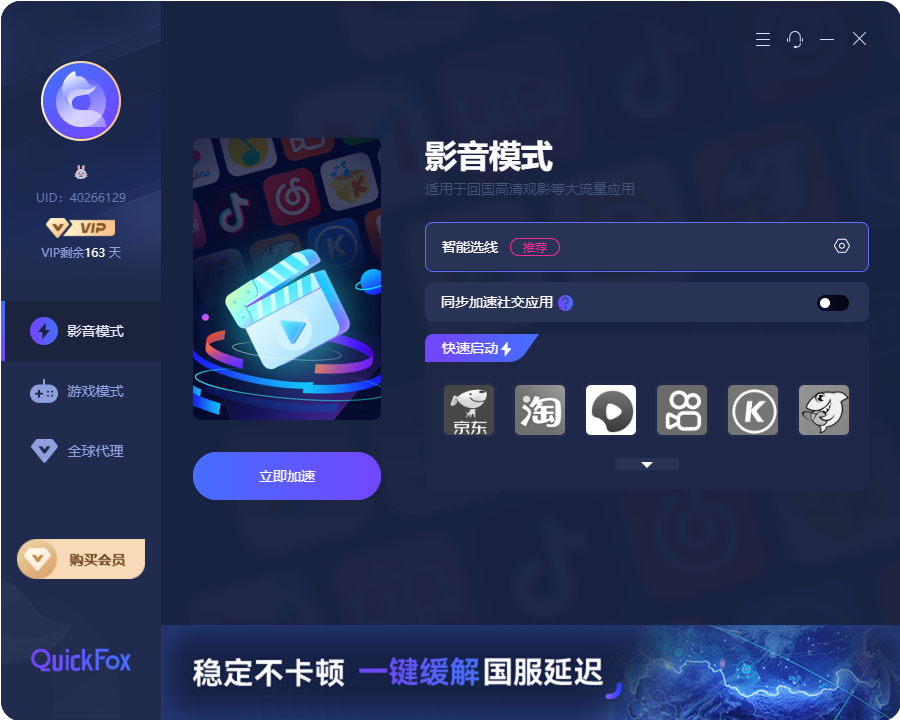
该模式适用于大陆常规的影音平台,看视频听音乐刷网页等其他较大流量的使用,例如爱奇艺,腾讯视频,QQ音乐,网易云等。
This mode is applicable to the conventional video and audio platforms in mainland China, such as iQIYI, Tencent Video, QQ Music, NetEase Cloud Music, etc., for watching videos, listening to music, browsing web pages and other uses with large traffic.
1.1加速连线 Accelerate connection
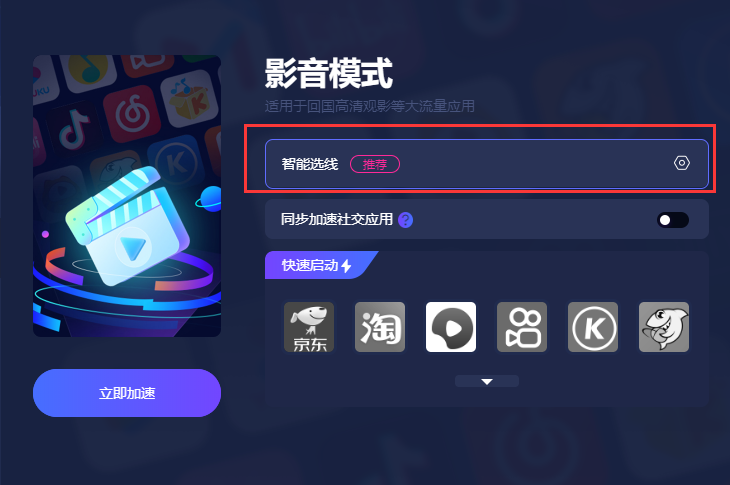
点击【立即加速】按钮后,系统会根据此前用户设定过的默认线路选择进行线路连接。如果未选默认线路,则以智能选线方式连接线路,建议优先使用智能选线。
After clicking the "Accelerate Now" button, the system will connect to a server line based on the default line selected by the user previously. If no default line has been selected, the system will connect via the intelligent line - selection method. It is recommended to use the intelligent line - selection method as a priority.
1.2线路设置 Route settings
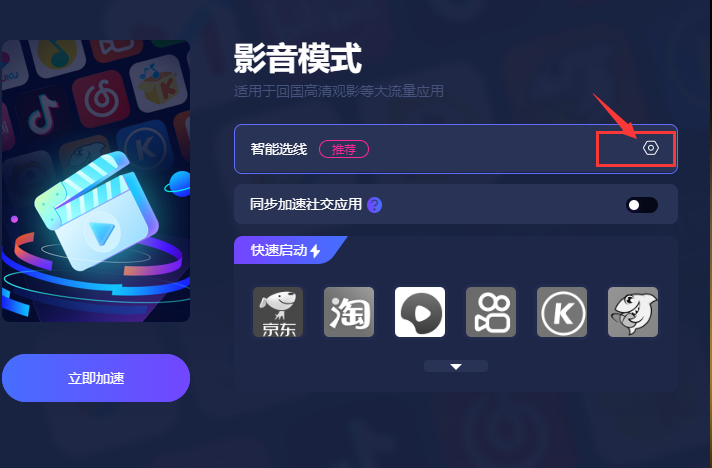
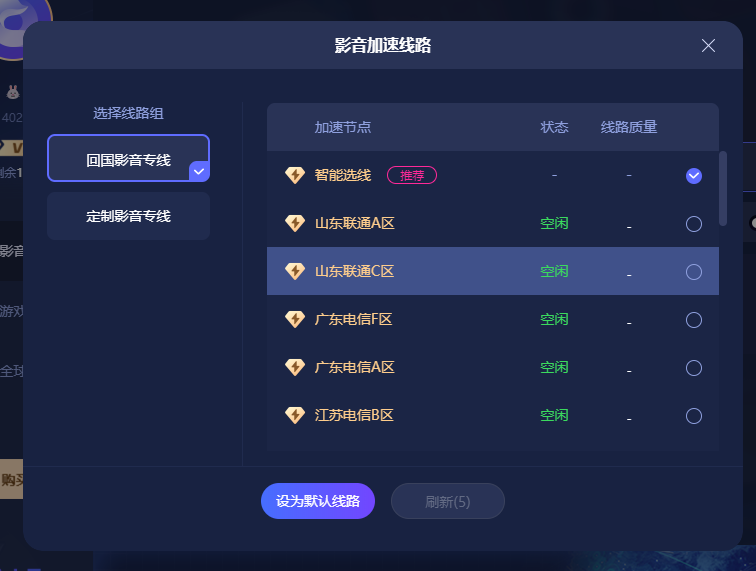
1、未加速状态下,点击小齿轮【设置】图标,显示【影音加速线路】弹窗,可进行线路选择配置设为默认线路。系统根据用户的设置显示默认线路池名称,或智能选线。
注意:如果用户设置的默认线路已下架,系统会显示线路名称+(暂时下架)字样,例如:青岛联通A区(暂时下架)。并且系统会以自动选线的方式为用户连接。
1. In the unaccelerated state, click on the small gear [Settings] icon, and a pop - up window titled [Video and Audio Acceleration Routes] will appear. Here, you can select a route and configure it as the default route. The system will display the name of the default route pool according to the user's settings, or use the intelligent route - selection feature.
Note: If the default route set by the user has been taken off the shelves, the system will display the route name followed by "(Temporarily Off - Shelf)", for example, "Qingdao Unicom Area A (Temporarily Off - Shelf)". And the system will connect for the user in an automatic route - selection manner.
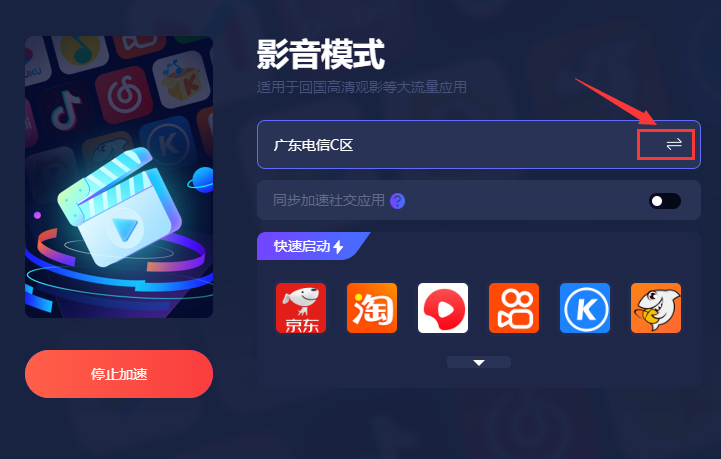
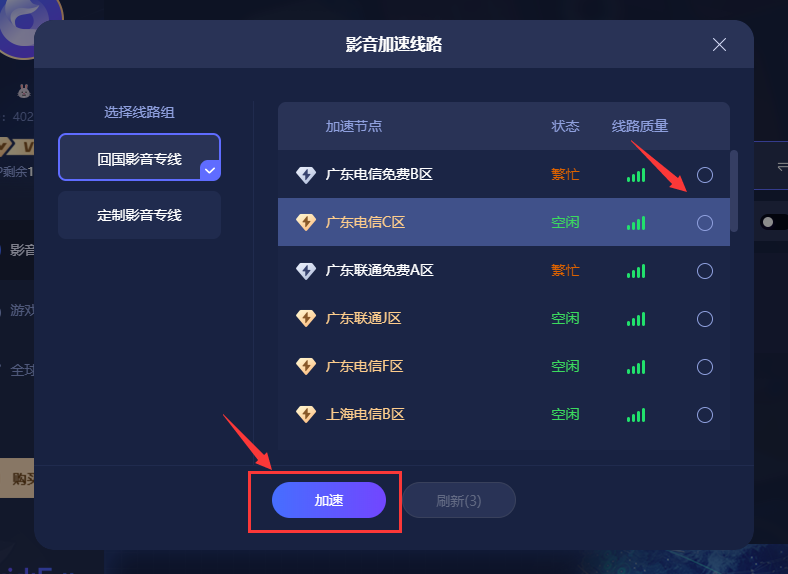
2、已加速状态下,显示当前连接线路的线路名称,可进行线路切换操作,点击【切换】图标,在配置弹窗内,进行线路选择。选择后,点击加速按钮,会根据配置的新线路进行加速。
3、正在加速读条状态下,线路设置不可操作智能选线和默认选线的切换,需完成加速或停止加速后才能操作。
2.When in the accelerated state, the name of the currently connected line is displayed. You can perform the line - switching operation. Click the [Switch] icon, and then select a line within the configuration pop - up window. After selection, click the acceleration button, and the system will accelerate according to the newly configured line.
3.When the acceleration progress bar is in progress, the line settings, including the switching between intelligent line selection and default line selection, are unavailable. Operations can only be carried out after the acceleration is completed or stopped.
1.3快速启动 Quick launch
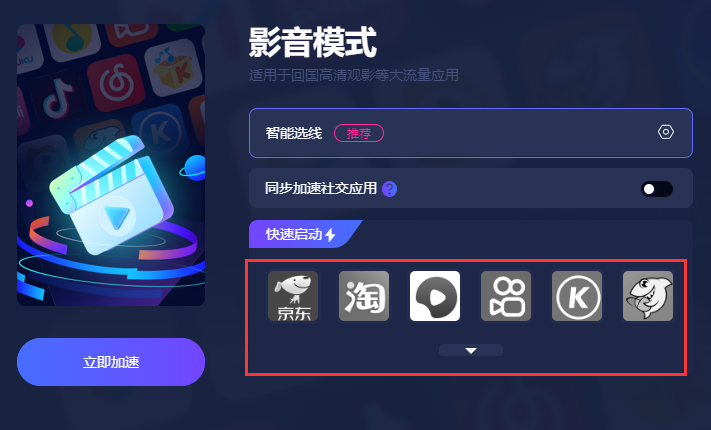
在快速启动区域,点击下拉按钮,弹窗显示完整快速启动列表。可点击收起。在未加速和加速过程中,【快速启动】图标为置灰状态,不可点击操作。
In the quick launch area, click the drop-down button and a pop-up window will display the complete quick launch list. You can click to collapse it. During the process of not accelerating and accelerating, the [Quick Launch] icon is grayed out and cannot be clicked or operated.
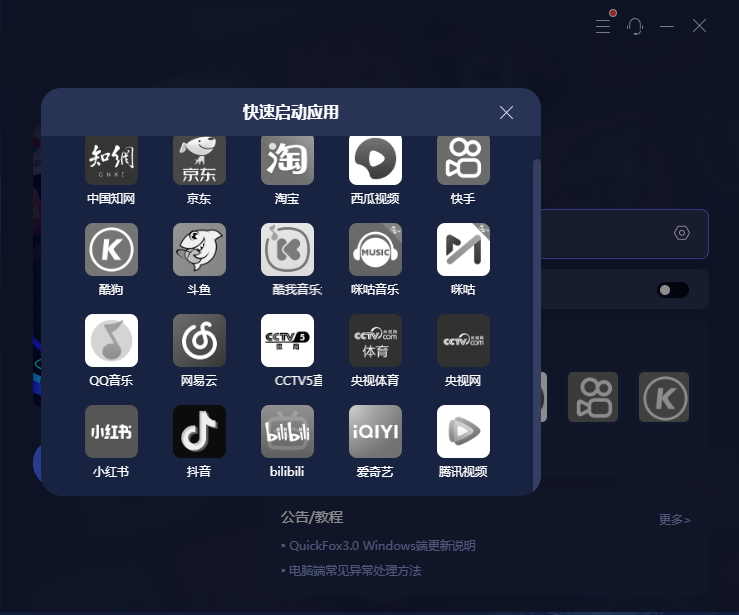
加速成功后,图标变为彩色,点击对应的IOCN图标,即可通过浏览器打开对应的网站地址。若有需要添加某些大陆网站至快速启动应用列表内,可联系小狐狸微信号quickfox2019或quickfox2025登记审核后,技术人工添加。
After successful acceleration, the icon turns colorful. Click the corresponding IOCN icon, and you can open the corresponding website address through a browser. If you need to add certain mainland Chinese websites to the quick - launch application list, you can contact the WeChat account of Little Fox, either quickfox2019 or quickfox2025. After registration and review, our technical staff will add them manually.
1.4同步加速社交应用 Sync and Accelerate Social Apps
该功能适用于需要加速微信、QQ等社交软件,需打开同步社交应用按钮,若未完成实名,无法加速微信和QQ等社交软件。实名步骤详见:https://support.qq.com/products/325761/faqs/148011
This feature is applicable to social media apps such as WeChat and QQ that require acceleration. You need to turn on the "Sync Social Apps" button. If you haven't completed real - name authentication, you won't be able to accelerate apps like WeChat and QQ. For details on the real - name authentication steps, please visit: https://support.qq.com/products/325761/faqs/148011
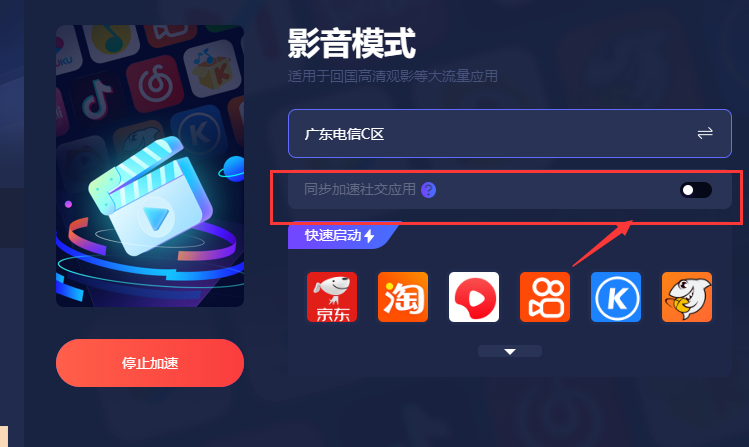
1、已加速状态,【同步加速社交应用】选项,为不可选状态,不可操作。
2、未加速状态,用户点击【同步加速社交应用】选项时,将判断用户是否实名。
用户未实名,需前往加速器移动端完成实名。
用户实名完成后,用户可以选择社交APP进行加速,例如微信、QQ等。
1. When in the accelerated state, the "Synchronously Accelerate Social Apps" option is in an unselectable state and cannot be operated.
2. When in the unaccelerated state, when a user clicks on the "Synchronously Accelerate Social Apps" option, the system will check whether the user has completed real - name authentication.
If the user has not completed real - name authentication, they need to go to the mobile version of the accelerator to complete it.
After the user has completed real - name authentication, they can choose social apps such as WeChat and QQ for acceleration.
2、游戏模式 Game Mode
该模式适用于国服游戏,例如王者荣耀、和平精英、原神等。
This mode is applicable to games of the Chinese mainland server, such as Honor of Kings, Peace Elite, Genshin Impact, etc.
2.1游戏主界面 the main game interface
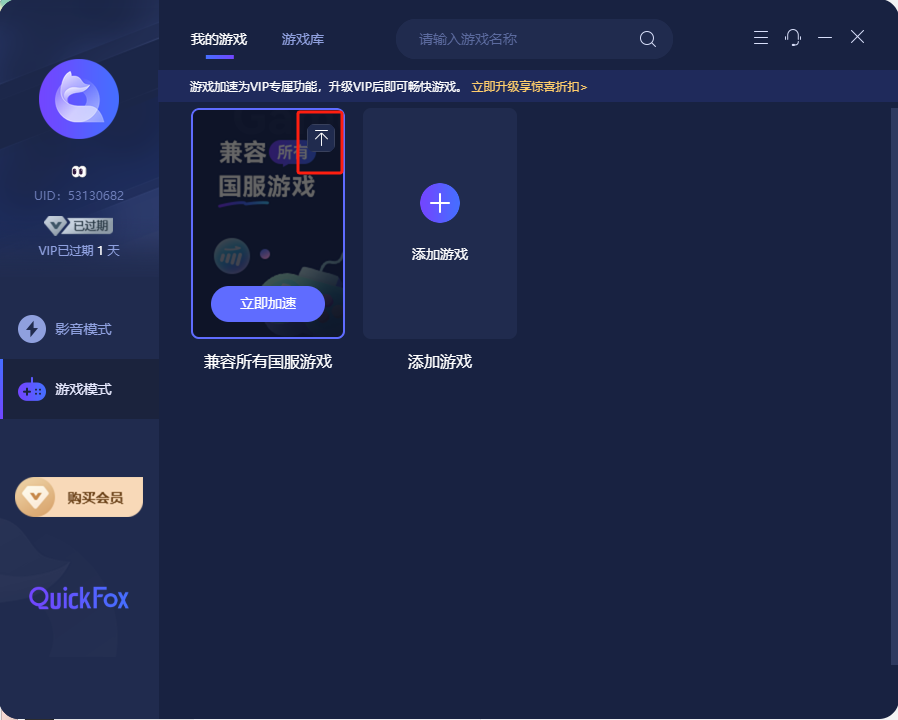
游戏主界面,默认显示【兼容所有国服游戏】卡片,点击此卡片进行加速,会兼容所有国服游戏,【游戏通用加速】可设置【置顶】,【置顶】后将默认显示在前排,不可【删除】。
On the main game interface, the "Compatible with All Chinese Mainland Server Games" card is displayed by default. Clicking this card for acceleration will make it compatible with all Chinese mainland server games. For "Universal Game Acceleration", you can set it to "Pin to Top". After setting "Pin to Top", it will be displayed in the front row by default and cannot be "Deleted".
2.2游戏加速 game acceleration
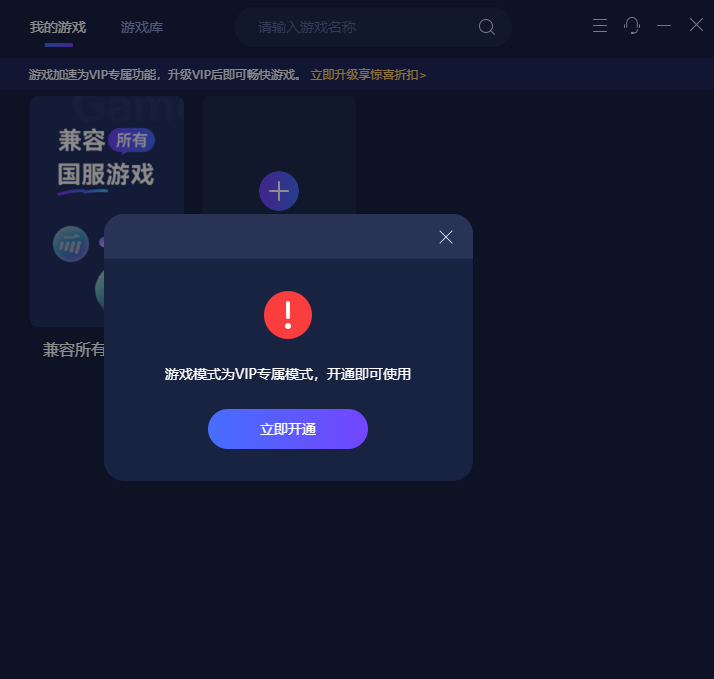
游戏加速模式仅VIP用户可使用,若您暂时是免费用户,需要体验游戏模式,您可考虑开通会员或在加速器移动端-更多-福利中心领取会员体验时长。
The game acceleration mode is only available to VIP users. If you are currently a free user and wish to experience the game mode, you may consider subscribing to a membership or obtaining free membership trial duration in the Welfare Center on the mobile version of the accelerator. You can access it by going to "More" on the mobile app.
2.3添加游戏 Add Game
该功能适用于加速指定国服游戏应用。
This function is applicable to accelerating specified Chinese mainland server game applications
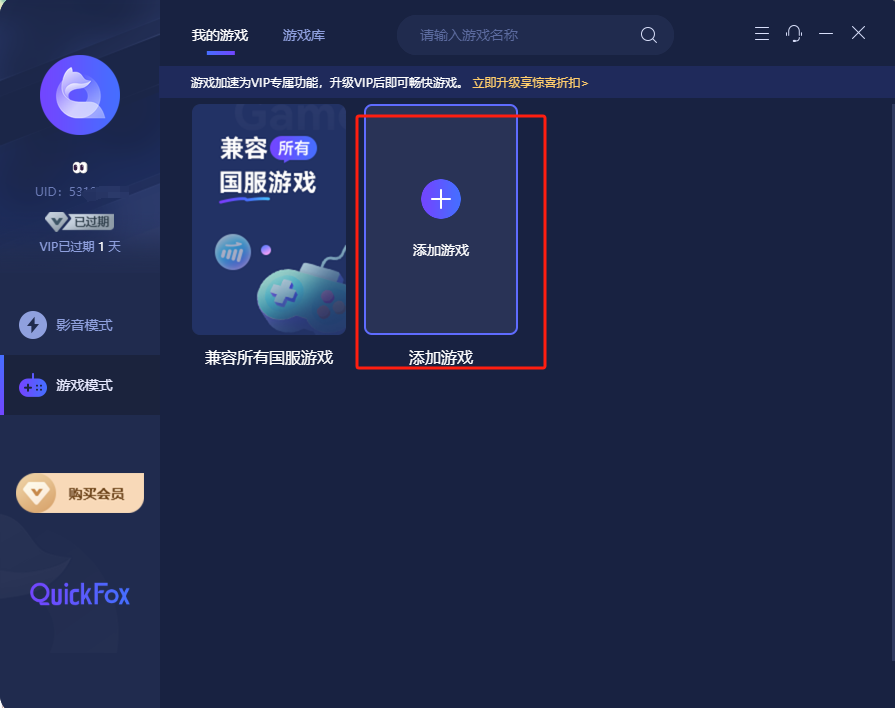
点击添加游戏,进入游戏库界面。在游戏库中选择游戏会对单个游戏进行加速,加速过的游戏会显示到游戏模式主界面中。
Click "Add Game" to enter the game library interface. Selecting a game in the game library will accelerate that single game, and the accelerated games will be displayed on the main interface of the game mode.
2.4游戏库 Game Library
该功能用于指定某款国服游戏加速,可屏蔽其他非该游戏流量,游戏效果更佳。
This function is used to accelerate a specific game on the Chinese mainland server. It can block the traffic of other non - relevant games, resulting in a better gaming experience.
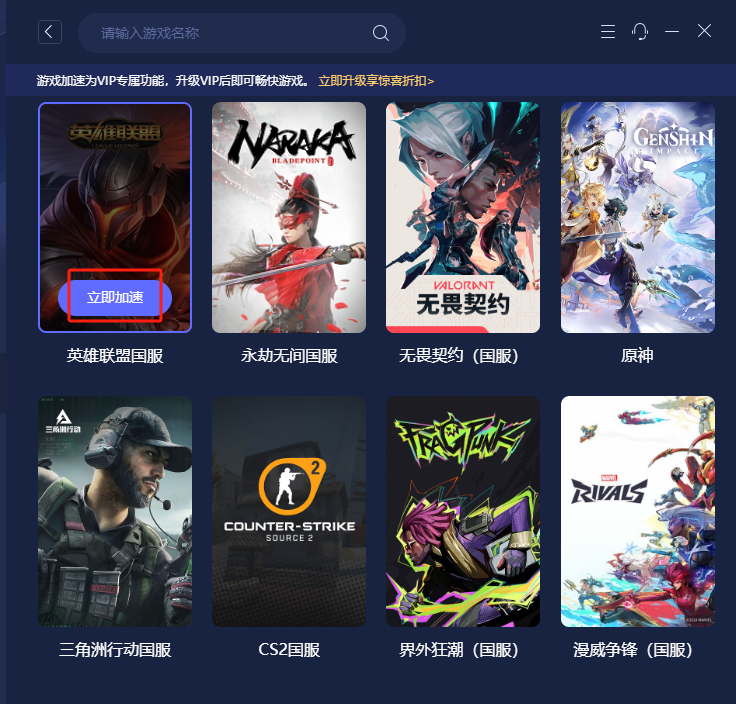
在游戏库中,最上方,可进行游戏的搜索。选择游戏点击【立即加速】会对单个游戏进行加速,加速过的游戏会显示到游戏模式主界面中,注:游戏必须由用户自行下载安装在电脑内,无法通过加速器页面进行下载安装。
在游戏库中,已加速的游戏,点击【查看加速详情】,跳转到该游戏的加速界面。点击停止加速,则跳转到该游戏加速界面,同时停止加速。
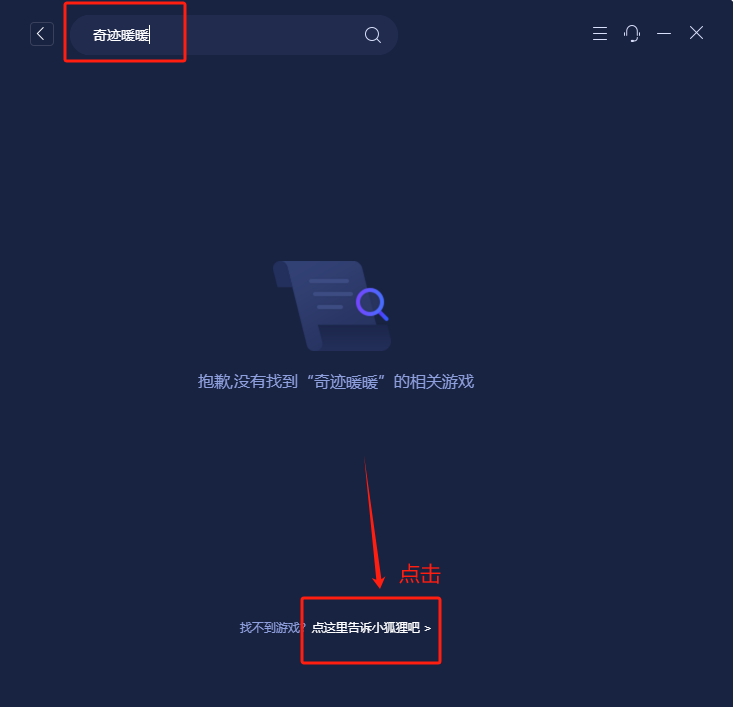
若您需要加速的游戏并未在游戏库内搜索到,您可点击“告诉小狐狸”后,在弹出的输入框内填写需要加速的游戏进行上报,我们技术人员会定时进行审核添加。
In the game library, at the very top, you can search for games. Select a game and click [Accelerate Now] to accelerate a single game. The accelerated games will be displayed on the main interface of the game mode. Note: Games must be downloaded and installed on your computer by yourself and cannot be downloaded and installed through the accelerator page.
In the game library, for games that have been accelerated, click [View Acceleration Details] to jump to the acceleration interface of that game. Click [Stop Acceleration], and you will be redirected to the acceleration interface of that game, and the acceleration will stop simultaneously.
If the game you need to accelerate is not found in the game library, you can click "Tell Little Fox", and then fill in the game you need to accelerate in the pop - up input box for reporting. Our technical staff will conduct regular reviews and add the games.
2.5游戏加速页Game Acceleration Page
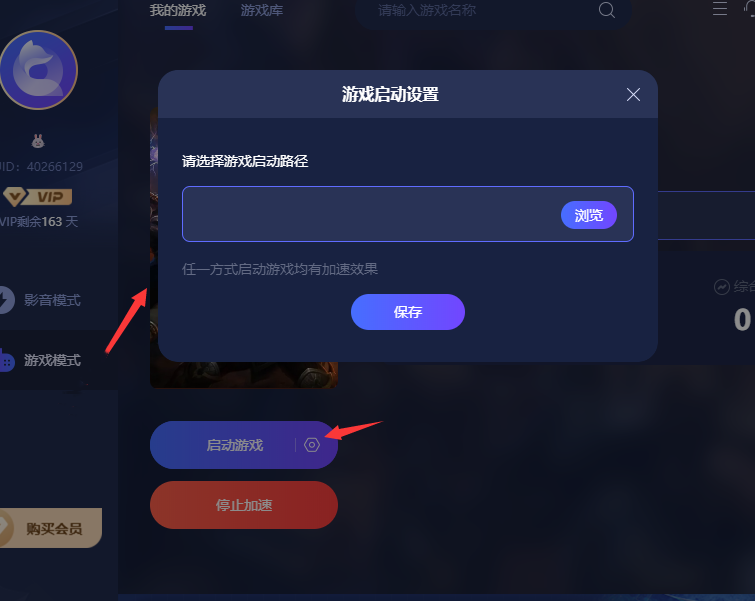
已加速的游戏,点击【启动游戏】,系统会判断用户是否设置了该游戏启动路径,如未设置,会弹出【游戏启动设置】弹框。用户设置后,系统会根据设置的路径启动游戏。如需修改,可点击设置按钮,对启动路径进行修改。
For an accelerated game, when you click [Launch Game], the system will check if you have set the game launch path. If not, a [Game Launch Settings] pop - up box will appear. After you make the settings, the system will launch the game according to the set path. If you need to modify the path, you can click the settings button to change the launch path.
2.6线路设置Route Settings
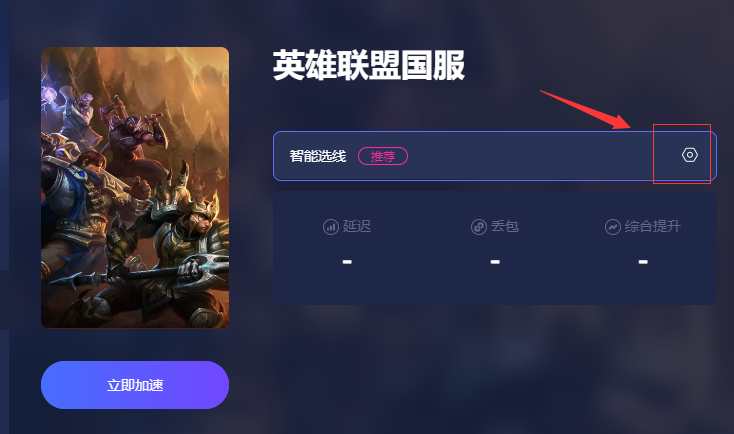
未加速状态下,点击小齿轮【设置】图标,显示【游戏加速线路】弹窗,可进行线路选择配置设为默认线路。系统根据用户的设置显示默认线路池名称,或智能选线,优先推荐使用智能选线。
In the non-accelerated state, click the small gear [Settings] icon, and the [Game Acceleration Line] pop-up window will appear. You can select and configure the line and set it as the default line. The system will display the name of the default line pool according to the user's settings, or select the line intelligently, and the intelligent line selection is recommended first.
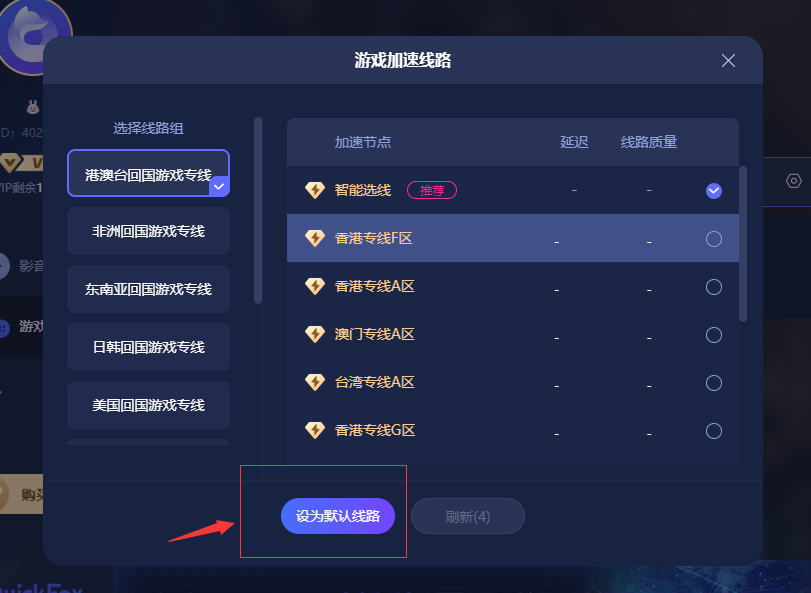
注意:如果用户设置的默认线路已下架,系统会显示线路名称+(暂时下架)字样,例如:青岛联通A区(暂时下架)。系统会以自动选线的方式为用户连接。
Note: If the default route set by the user has been taken off the shelves, the system will display the route name followed by "(Temporarily Off the Shelves)", for example, "Qingdao Unicom Area A (Temporarily Off the Shelves)". The system will connect for the user by automatically selecting a route.
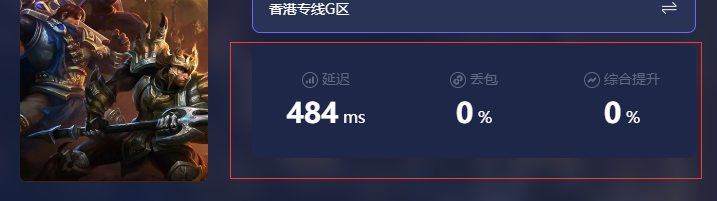
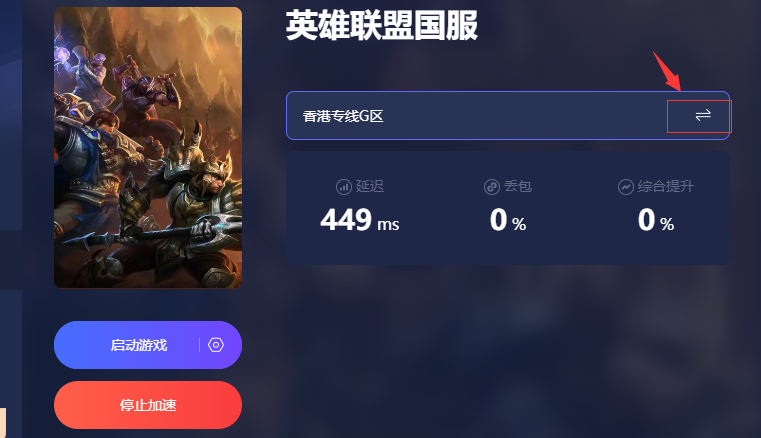
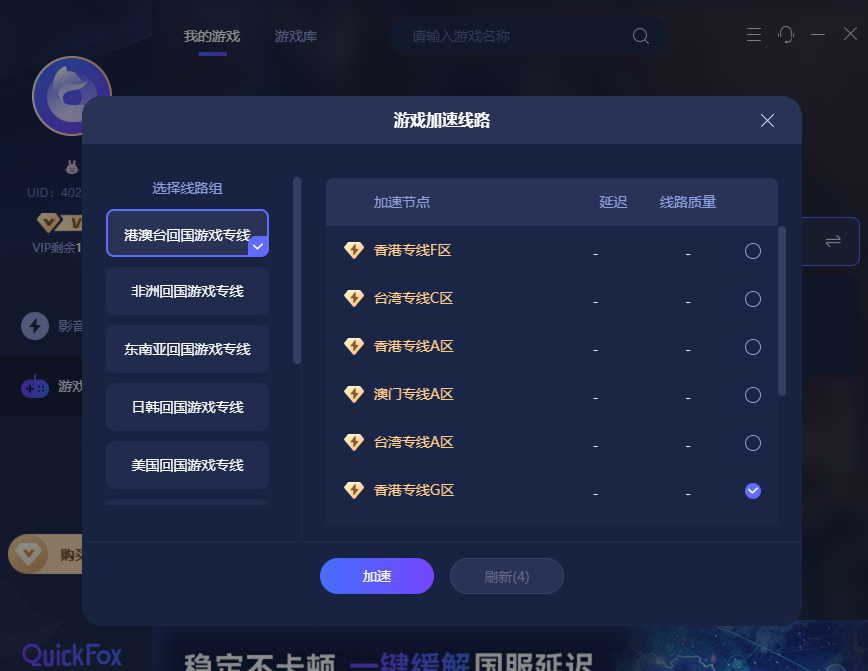
加速状态下,下方显示线路延迟、丢包、综合提升 的参数信息。可点击切换图标,打开选线列表弹窗,进行线路切换设置,选择好线路后,点击【加速】按钮,系统会用新选择的线路,重新进行加速。
When in the acceleration state, parameter information such as line latency, packet loss, and overall improvement is displayed at the bottom. You can click the switch icon to open the route selection list pop - up window and set up route switching. After choosing a route, click the [Accelerate] button, and the system will re - accelerate using the newly selected route.
3、功能操作栏 Functional Operation Bar
该功能栏可查看账户信息,会员订单,设置相关内容
This function bar allows you to view account information, membership orders, and configure relevant settings.
3.1账户 Account
包含账户信息,会员订单点击后会跳转QuickFox官网,显示相关信息
Contains account information. Clicking on "Membership Orders" will redirect you to the official website of QuickFox, where relevant information will be displayed.
3.2功能 Functions
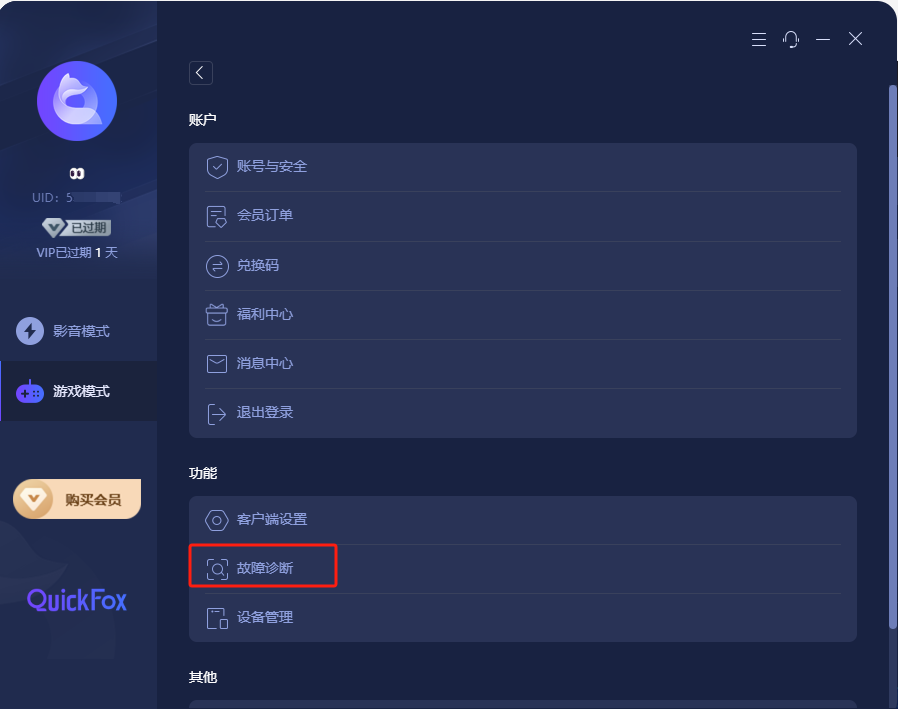
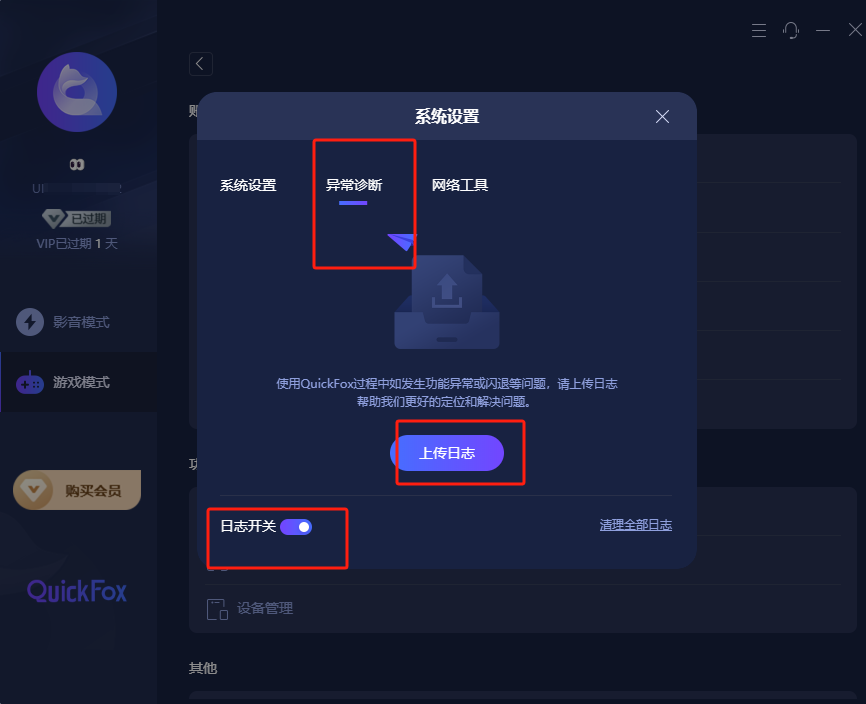
若出现使用问题,日志开关是默认打开状态,需上传日志后,联系客服进行排查
If any usage issues occur, the log switch is in the default on state. You need to upload the logs and then contact the customer service for troubleshooting.
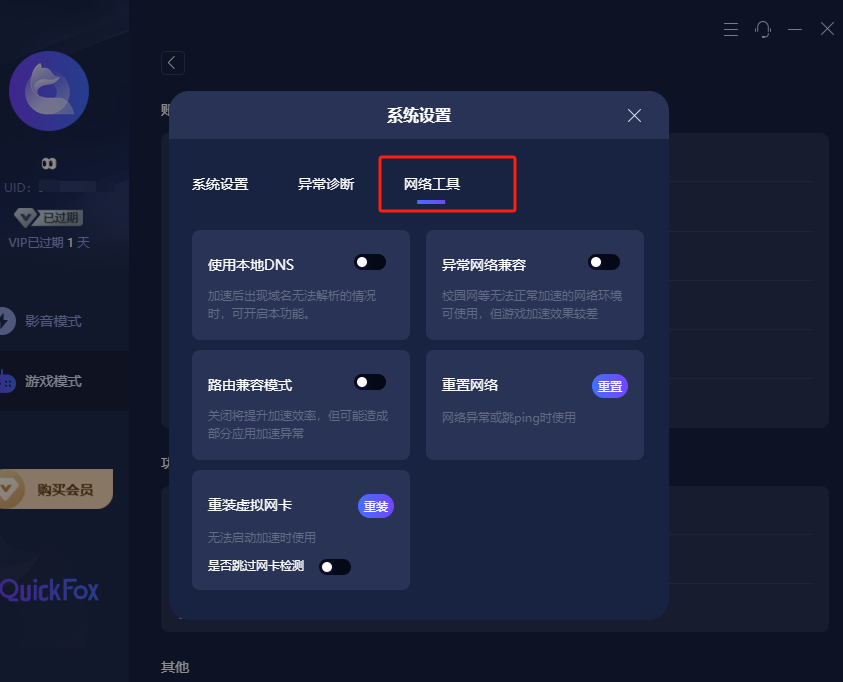
网络工具在特殊情况下进行操作,未出现相应问题,请勿随意打开按钮,否则会出现加速器延迟升高等使用问题。
Only operate the network tools under special circumstances. If no corresponding issues occur, do not randomly click the buttons. Otherwise, problems such as increased accelerator latency may arise.